If you have applied to a large company in the last five years, there is a reasonable chance you went through Workday. It runs the career portals for roughly half the Fortune 500, processing somewhere north of 35 million applications each year. But most applicants interact with it without understanding what the system is actually doing with their information, and that lack of understanding costs them.
This guide walks through what happens on both sides of a Workday application. Not tips for gaming the system, but a factual account of how the portal works, where data goes, and what choices on the applicant's end have consequences that are not obvious from the interface.
Applying through myworkdayjobs.com? Check these first.
- - Use standard section labels: Experience, Education, Skills.
- - Keep critical text out of headers, footers, images, and text boxes.
- - Match the job posting's exact terminology when your experience truthfully supports it.
- - Review the Workday profile fields after upload before submitting.
First optimization free, no card. After that $1.5 each (was $3).
The two versions of you inside Workday
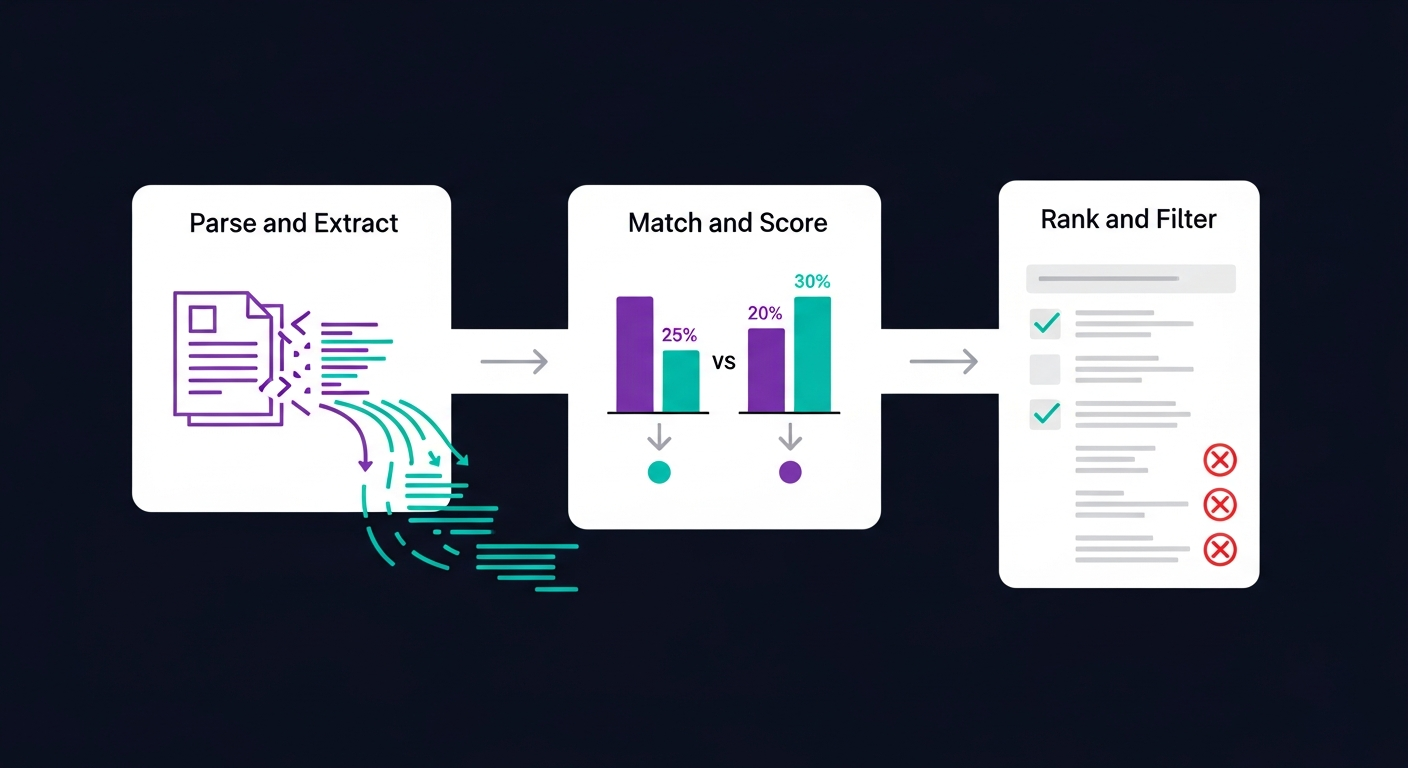
Here is something that surprises most people: when you apply through Workday, the system creates and maintains two separate representations of you. One is your uploaded resume file. The other is a structured candidate profile that Workday builds by parsing that file and combining it with whatever you type into form fields.
These two things are not the same, and they do not always agree with each other. The resume file sits in storage largely as-is. The parsed profile is what Workday actually uses for matching and scoring. If the parser misreads your resume, your profile may be missing skills, have wrong job titles, or show incorrect dates. You would not know this happened unless you checked the profile after submitting.
Why this matters
When a recruiter searches for candidates or when Workday's automated screening runs, it queries the structured profile, not the PDF you uploaded. A well-written resume that parses badly is functionally invisible to the system. The recruiter might eventually open the PDF manually, but only if the profile data got you past the initial filter.
What happens in the first 30 seconds after you click "Submit"
The parsing step is fast. Within seconds of your submission, Workday's parser attempts to break your resume into structured fields: name, contact details, work history entries (each with company, title, start date, end date, and responsibilities), education entries, and a skills list.
The parser handles standard formats well. A single-column resume with conventional section headers ("Experience," "Education," "Skills"), standard date formats (January 2020 or 01/2020), and plain text will parse cleanly almost every time.
Where parsing breaks down is with visual complexity. Specifically:
- Multi-column layouts confuse the reading order. The parser reads top-to-bottom, so content in a left sidebar may get interleaved with the main column in ways that scramble your work history.
- Tables and text boxes are treated as floating elements. Content inside them may be extracted out of order or skipped entirely.
- Header and footer content (your name and contact info placed in the page header) is sometimes ignored by the parser because it treats headers as document metadata, not body content.
- Creative section titles like "Where I've Made an Impact" instead of "Experience" cause the parser to miscategorize the section, potentially filing your work history under an unknown bucket.
The questionnaire step nobody takes seriously enough
After uploading your resume, most Workday portals present a series of screening questions. These look routine, like a formality. They are not.
Workday has a feature called "knockout questions" that lets recruiters designate certain questions as automatic disqualifiers. If you answer incorrectly, your application is removed from consideration regardless of how well your resume matches the job. The system does not tell you which questions are knockouts. They look identical to every other question in the form.
Common knockout question patterns
Answering "No" is almost always an automatic rejection, even for roles that could sponsor.
If the recruiter set a minimum of 5 and you enter 4, you fail. There is no partial credit or rounding.
For on-site roles, "No" or "Maybe" may trigger an automatic disqualification depending on how the recruiter configured it.
The frustrating part is that you can score perfectly on the resume match and still be eliminated by a single questionnaire answer. And because the rejection is automated, no human reviews the decision. Your application moves to a "declined" status, and you receive a generic rejection email days or weeks later.
How scoring actually works (and what it weighs)
Workday's matching engine compares your parsed profile against the requirements the recruiter entered when creating the job requisition. Not every requirement carries the same weight. Recruiters in Workday can designate requirements as "required," "preferred," or "nice to have," and the system scores accordingly.
Based on publicly available information about Workday's recruiting module and observations from processing large numbers of applications through it, the approximate weighting looks like this:
Approximate scoring breakdown
One thing worth noting: Workday does some semantic matching, not just exact keyword matching. It understands that "project management" and "PM" refer to the same thing, and that "Python programming" and "Python development" overlap. But exact matches score higher than semantic equivalents, so including both the spelled-out term and its abbreviation is still worthwhile when truthful.
The recruiter's view: what they see vs. what you submitted
On the recruiter side, Workday presents candidates in a ranked list. Each candidate card shows the match score, a summary of parsed qualifications, and the status of any knockout questions. The recruiter can click into a full profile view that shows the parsed data alongside a link to download the original resume file.
In practice, many recruiters work primarily from the parsed profile summary and the match score, especially when a popular job posting has generated hundreds of applications. They may never open the actual resume file for candidates below a certain score threshold. This is why parsed profile accuracy matters so much. If the parser dropped your most recent job title, the recruiter sees a candidate who appears to have less experience than they actually do.
A useful mental model: treat your resume not as a document for human reading, but as a data source that a machine will convert into a structured record. The structured record is what determines your fate in Workday.
Workday's "Apply with LinkedIn" and other quick-apply features
Many Workday portals offer "Apply with LinkedIn" or "Apply with Indeed" buttons. These pull profile data from the external platform into the Workday application form. The convenience is obvious, but there are trade-offs.
LinkedIn profiles often contain different content than a tailored resume. Your LinkedIn might have a broad summary and a long list of skills, while a targeted resume would emphasize specific experience relevant to this particular job. When you use quick-apply, Workday ingests the LinkedIn data as-is and runs it through the same matching engine. For generic roles where your LinkedIn profile happens to align with the requirements, this works fine. For specialized roles where keyword alignment matters, you are likely better off uploading a tailored resume.
The candidate profile you probably did not finish setting up
When you create an account on a Workday career site, the system creates a persistent candidate profile tied to your email. This profile carries across all jobs you apply to at that company. It also carries across different companies using Workday if you use the same email, though the sharing is limited to basic profile data.
Most applicants create this profile once, auto-fill it from their resume, and never look at it again. That is a mistake. The auto-filled profile frequently has errors from parsing: wrong date ranges, missing skills, education degrees listed under work experience, and so on. Since the profile data feeds directly into the matching engine, these errors silently reduce your scores across every application you submit through that portal.
Worth doing once
After creating or updating your Workday profile on a company's career site, go back and review every field the parser filled in. Check:
- - Job titles are correct and complete
- - Date ranges have no gaps caused by parsing errors
- - Skills listed actually match what was in your resume
- - Education entries show the right degree level and institution
- - Contact information (email, phone) is present and current
How Ajusta accounts for Workday-specific behavior
When Ajusta detects that a job posting originates from a Workday portal (which it identifies from the URL structure and page metadata), it adjusts its optimization to account for Workday's parsing patterns. This means it checks for formatting elements that are known to cause parsing failures in Workday specifically, flags section headers that Workday's parser will not recognize, and verifies that your resume's content aligns with the job requirements using the same weighting priorities Workday's matching engine uses.
The goal is not to game the system. It is to make sure the version of you that Workday constructs from your resume is an accurate representation of your actual qualifications. When the parsing works correctly and the content alignment is genuine, the system works as intended for both sides.
Frequently asked questions
Can Workday read PDF resumes?
Yes. Workday's parser handles PDF files. The file format matters less than the internal structure. A cleanly formatted PDF with selectable text parses well. A PDF created from a scanned image or one with heavy graphical elements may not parse correctly. The key factor is whether the text layer is intact and the layout is straightforward.
Is Workday an ATS?
Yes. Workday Recruiting is an applicant tracking system inside the broader Workday HCM platform. Companies use it to host job postings, collect applications, parse resumes, manage candidate profiles, run screening workflows, and move applicants through recruiter review.
How does Workday screen resumes?
Workday parses your uploaded resume into a structured candidate profile, then compares that profile and your application answers against the job requisition. Recruiters can configure required skills, preferred qualifications, screening questions, and workflow rules. The uploaded file still matters, but the parsed profile is what drives much of the early filtering.
What resume format works best for Workday?
A single-column PDF or DOCX with selectable text, standard headings, simple bullets, and consistent dates is safest. Avoid scanned PDFs, image-only text, complex tables, text boxes, and critical information placed only in headers or footers. Workday can store the original file, but parsing quality depends on the document structure.
Does applying to multiple jobs at the same company hurt my chances?
Workday tracks all your applications under one candidate profile. Recruiters can see how many positions you have applied to. Applying to two or three related roles is normal and generally not a problem. Applying to fifteen unrelated positions may signal a lack of focus to recruiters who review your profile. There is no automated penalty, but the visibility is there.
Why did I get rejected minutes after applying?
An immediate or near-immediate rejection almost always means you failed a knockout question. These are automated disqualifiers set by the recruiter. The rejection happens without human review. If you are sure your qualifications match, review the screening questions you answered during the application. One incorrect answer to a knockout question overrides everything else.
Should I use Workday's 'Apply with LinkedIn' option?
It depends on how well your LinkedIn profile matches the specific job. Quick-apply pulls your LinkedIn data directly into Workday's matching engine. If your LinkedIn profile is broad and generic while the job is specialized, you will likely get a lower match score than if you submitted a tailored resume. For general roles where your LinkedIn closely mirrors the requirements, it is a reasonable time-saver.
Does my Workday candidate profile carry across different companies?
Partially. Basic profile data (name, contact info, general work history) can be shared across Workday-powered career sites if you use the same email. However, each company's portal maintains its own application records and screening configurations. Your match score at Company A has no bearing on your candidacy at Company B, even if both use Workday.
How do I know if a company uses Workday for hiring?
The most reliable sign is the URL of the career portal. Workday career sites typically have URLs containing 'myworkdayjobs.com' or 'wd5.myworkdaysite.com' (the number may vary). The application interface also has a distinctive look: a left sidebar navigation with your profile, a blue-and-white color scheme, and specific field layouts for work history entry.